

Lab Details
Lab Vendor: Cisco
Lab Name: VLAN
Lab Level: Beginner
Lab Published: Sept 30, 2026
Lab Author: Hind Networks
Lab Download
- Lab Topology
- Lab Workbook (.pdf)
- Lab Practical (Packet Tracer)
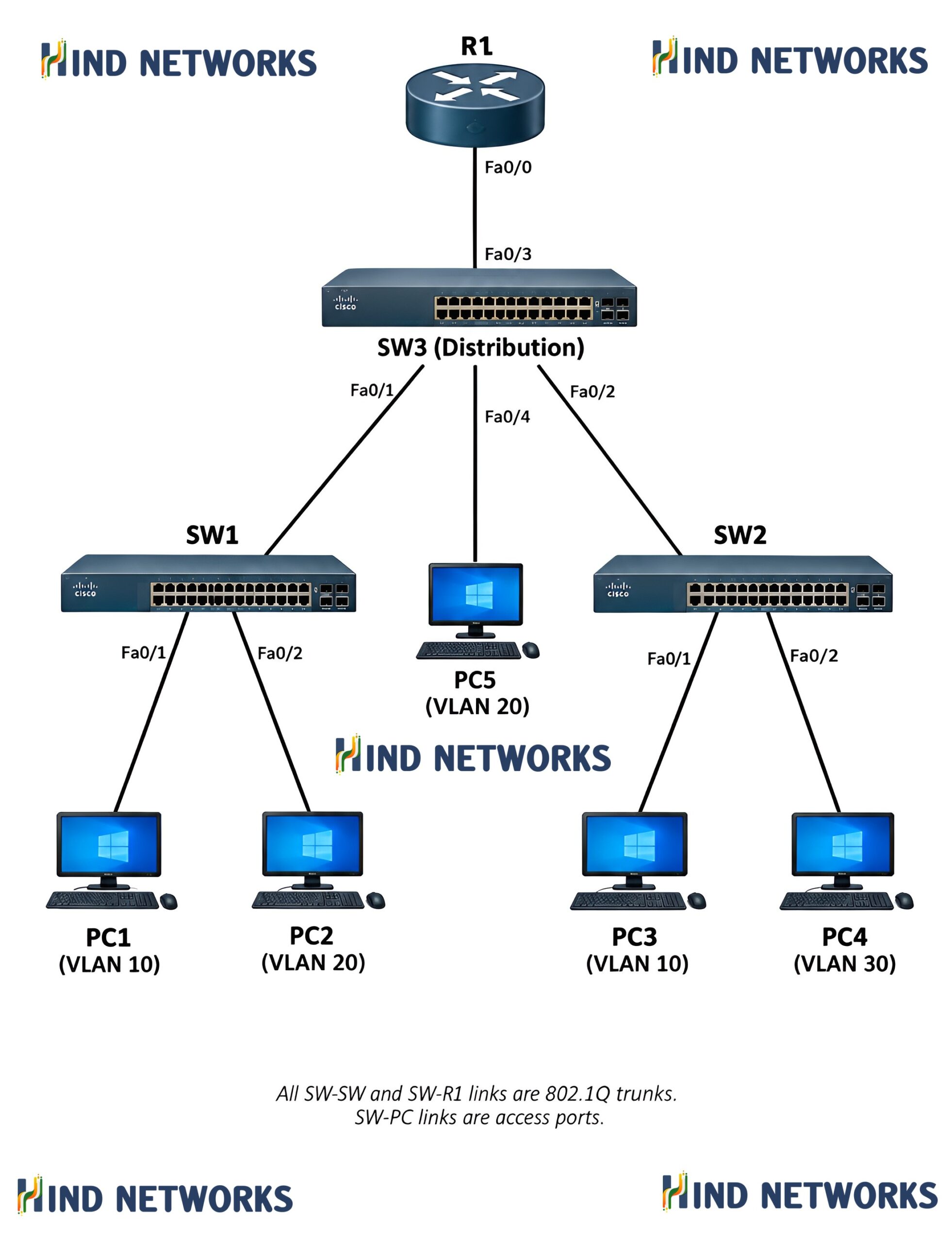
Absolutely. Since you already have a VLAN practical lab workbook to attach to the post, the theory should work as a professional introduction to the lab—educational, structured, and suitable for a networking training website.
VLAN (Virtual Local Area Network)
Introduction
A VLAN (Virtual Local Area Network) is a logical network created within a physical network infrastructure. VLANs allow network administrators to divide a single physical switch network into multiple separate logical networks, even when the connected devices are physically connected to the same switch.
Without VLANs, all devices connected to the same Layer 2 switch generally belong to the same broadcast domain. As the network grows, this can result in unnecessary broadcast traffic and make network management more difficult.
VLANs solve this problem by logically separating devices into different broadcast domains.
What is a VLAN?
A VLAN is a logical grouping of network devices that allows devices to communicate as if they were connected to the same physical network, regardless of their physical location.
For example, consider an organization with three departments:
- VLAN 10 – HR
- VLAN 20 – Finance
- VLAN 30 – IT
All three departments may be connected to the same physical switch, but VLANs can logically separate their traffic.
Devices in VLAN 10 will normally communicate within VLAN 10, while devices in VLAN 20 and VLAN 30 remain in their respective broadcast domains.
Why Do We Use VLANs?
VLANs are commonly used in enterprise networks for network segmentation, security, performance, and easier administration.
1. Network Segmentation
VLANs divide a large network into smaller logical networks. This makes it easier to organize devices according to departments, functions, or requirements.
2. Broadcast Control
Each VLAN represents a separate broadcast domain. Broadcast traffic generated in one VLAN does not normally propagate to other VLANs.
This helps reduce unnecessary broadcast traffic across the network.
3. Improved Security
VLANs can provide logical separation between different groups of users and devices.
For example, employee computers, servers, guest users, and management devices can be placed into separate VLANs.
VLANs provide logical segmentation, but VLAN separation alone should not be considered a complete security solution. Additional controls such as ACLs and firewall policies may be required.
4. Easier Network Management
Network administrators can logically group devices based on their function rather than their physical location.
A user can be moved to another switch while remaining part of the same logical VLAN design.
5. Better Network Scalability
As an organization grows, VLANs make it easier to expand and organize the network without redesigning the entire physical infrastructure.
VLAN Types
Several VLAN types may be used in a network depending on the network design and purpose.
1. Default VLAN
The default VLAN on many switches is VLAN 1. Switch ports are commonly assigned to this VLAN by default.
In production environments, network administrators often use dedicated VLANs rather than relying on the default VLAN for normal user traffic.
2. Data VLAN
A Data VLAN is used to carry normal user-generated traffic, such as traffic from computers, laptops, and other end-user devices.
3. Management VLAN
A Management VLAN is used for managing network devices such as switches, routers, and other infrastructure equipment.
4. Voice VLAN
A Voice VLAN is used to carry IP phone traffic separately from normal data traffic.
5. Native VLAN
The Native VLAN is associated with untagged traffic on an 802.1Q trunk link. The native VLAN should be configured consistently on both ends of a trunk to avoid connectivity and security issues.
VLAN Ports
Switch ports are generally configured as either Access Ports or Trunk Ports.
Access Port
An access port normally belongs to a single VLAN and is commonly used to connect end devices such as:
- PCs
- Printers
- Servers
- IP phones
For example:
PC ───── Switch
        |
     Access Port
        |
      VLAN 10
An access port carries traffic for a single VLAN in a typical configuration.
Trunk Port
A trunk port is used to carry traffic from multiple VLANs across a single physical link.
Trunk links are commonly used between:
- Switch and Switch
- Switch and Router
- Switch and Layer 3 Switch
- Switch and other VLAN-aware network devices
The IEEE 802.1Q standard is commonly used to identify VLAN traffic across trunk links.
Example:
VLAN 10 ─┐
VLAN 20 ─┼── Trunk Link ── Switch
VLAN 30 ─┘
VLAN Tagging
When multiple VLANs travel across a trunk link, the Ethernet frames need to identify which VLAN they belong to.
With 802.1Q VLAN tagging, VLAN information is inserted into the Ethernet frame.
This allows network devices to distinguish traffic belonging to different VLANs while the traffic travels over the same physical trunk link.
VLAN and Broadcast Domains
One of the most important concepts of VLANs is broadcast-domain separation.
Suppose a switch has 24 ports and all ports belong to one VLAN. A broadcast generated by one device can reach other devices within that VLAN.
If the switch is divided into three VLANs:
             SWITCH
        ┌──────┼──────┐
        │      │      │
     VLAN 10 VLAN 20 VLAN 30
       HR    Finance    IT
Each VLAN becomes a separate broadcast domain.
This helps control broadcast traffic and provides logical separation between different groups of devices.
Communication Between VLANs
Devices in different VLANs cannot normally communicate directly at Layer 2.
For example:
PC-A                  PC-B
VLAN 10              VLAN 20
  │                     │
  └────── Switch ───────┘
PC-A and PC-B belong to different VLANs, so communication between them requires a Layer 3 device, such as:
- Router
- Layer 3 Switch
- Firewall
This process is commonly called Inter-VLAN Routing.
VLAN Configuration on Cisco Switches
In a Cisco switching environment, VLAN configuration typically involves the following steps:
- Create the VLAN.
- Assign a name to the VLAN.
- Assign switch ports to the appropriate VLAN.
- Configure trunk ports where required.
- Verify VLAN membership and trunk status.
Example:
Switch(config)# vlan 10
Switch(config-vlan)# name HR

Switch(config)# vlan 20
Switch(config-vlan)# name FINANCE
An access port can then be assigned to a VLAN:
Switch(config)# interface fa0/1
Switch(config-if)# switchport mode access
Switch(config-if)# switchport access vlan 10
A trunk interface can be configured to carry multiple VLANs:
Switch(config)# interface g0/1
Switch(config-if)# switchport mode trunk
The exact commands can vary depending on the Cisco IOS/platform and configuration requirements.
VLAN Verification
After configuring VLANs, network administrators should verify the configuration.
Common Cisco commands include:
show vlan briefThis command displays VLANs and their associated access ports.
To verify trunk interfaces:
show interfaces trunkTo examine an individual interface:
show interfaces <interface-id> switchportThese verification commands are useful for troubleshooting VLAN and trunk-related connectivity problems.
Advantages of VLANs
VLANs provide several important advantages:
- Logical network segmentation
- Reduced broadcast domains
- Improved network organization
- Better control over network traffic
- Easier network administration
- Improved scalability
- Logical separation of departments and services
- Support for efficient enterprise network design
VLAN Practical Lab
Understanding VLAN concepts is important, but configuring VLANs in a practical network environment provides a much clearer understanding of how VLAN segmentation actually works.
In this lab, you will work with VLAN configuration and observe how devices are logically separated within a switched network.
The practical workbook covers the configuration and verification steps required to understand VLAN operation in a hands-on environment.
Download or open the VLAN Lab Workbook below and follow the practical steps to build and verify the VLAN topology.
Conclusion
VLANs are a fundamental component of modern switched networks. They allow a physical network infrastructure to be logically divided into multiple broadcast domains, making networks easier to organize, manage, and scale.
Understanding VLANs, access ports, trunk ports, 802.1Q tagging, broadcast domains, and inter-VLAN communication provides an essential foundation for learning more advanced switching and enterprise networking concepts.
Now move from theory to practice with the VLAN Lab Workbook and configure VLANs in a real lab environment.