
Understanding IP Addressing
Every device on a network needs an IP address to communicate 🌐.
But did you know that IP addresses can be assigned manually or automatically? 🤔
This brings us to Static IP and Dynamic IP — two fundamental concepts in networking 🖧.
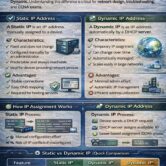
🔹 What is a Static IP?
A Static IP is an IP address manually assigned to a device.
It does not change unless a network admin updates it 🔒.
Key Features:
Permanent and fixed
Manually configured
Often used for servers, routers, and network printers 🖥️
Reliable for services that need a constant address
💡 Example: Your office printer has a static IP, so everyone can always print to the same address.
🔹 What is a Dynamic IP?
A Dynamic IP is an IP address automatically assigned to a device using DHCP 📡.
It can change over time based on availability.
Key Features:
Temporary and flexible
Assigned by a DHCP server
Common for PCs, laptops, smartphones, and IoT devices 📱
Reduces admin workload for large networks ✅
💡 Example: Your smartphone gets a new IP every time it connects to Wi-Fi.
⚙️ Static vs Dynamic IP – How They Work
Static IP:
Admin manually configures the IP on the device 📝
Device always uses that IP to communicate
Dynamic IP:
Device requests an IP from the DHCP server (DORA process) 📩
DHCP assigns an available IP temporarily ⏳
Device may receive a different IP next time
🌍 Real-Life Example
Think of IP addresses like house addresses 🏠:
Static IP → Permanent home address that never changes 🏡
Dynamic IP → Hotel room number that changes every check-in 🏨
Both are useful, depending on the purpose.
🎓 Static vs Dynamic IP in CCNA Exam
For CCNA 200-301, you should know:
How to assign static and dynamic IPs
Differences in use cases and benefits
Troubleshooting scenarios 🛠️
Example questions often test why a server uses static IP vs a client using dynamic IP.
✅ Final Takeaway
Static IP → Fixed, reliable, ideal for servers 🔒
Dynamic IP → Flexible, easy to manage, ideal for clients ⚡
Understanding these concepts is essential for network setup, management, and CCNA exam success 🚀.